Installing Plaivid on VMware
This guide complements the Overview and Prerequisites documentation and covers the installation of Plaivid as a Virtual Machine in a VMware ESXi environment.
In this scenario, PVM is not installed directly on the physical server. Instead, it runs on top of VMware.
This guide describes only the VMware-specific settings and requirements. Operating system installation and the initial PVM startup process are performed as described in the main installation guide.
Use Cases
Nested Virtualization is recommended for the following scenarios.
| Scenario | Description |
|---|---|
| Lab / Proof of Concept (POC) | Evaluate PVM capabilities without dedicated hardware |
| Training and Demo | Train technical teams or provide a demo environment for customers |
| Development and QA | Test new releases before deployment in production |
Differences from Physical Server Deployment
Because Plaivid is itself a hypervisor, running it inside VMware requires Nested Virtualization.
In addition to the standard installation process, several VMware-specific settings must be configured before deployment.
| Configuration | Description |
|---|---|
| Nested Virtualization | Enable virtualization capabilities for the guest |
| Network configuration | Configure Port Groups to pass traffic for internal virtual machines |
| CPU Virtualization | Expose CPU hardware capabilities to the virtual machine |
Running Plaivid with Nested Virtualization is not recommended for production environments unless approved by the CloudAvid technical team.
Because virtualization is performed through an additional hypervisor layer, overall performance will be lower than a native installation on physical hardware.
Prerequisites
Before starting the deployment, verify that all required resources are available.
Required Access
| Item | Description |
|---|---|
| VMware vCenter or ESXi | Sufficient access to create a VM and change CPU and network settings |
| SSH or ESXi Console | Optional, for troubleshooting |
| Plaivid ISO installation file | Rocky Linux 9 based version |
Virtual Machine Resources
Because Nested Virtualization introduces overhead, allocate more resources to the virtual machine than the normal minimum requirements.
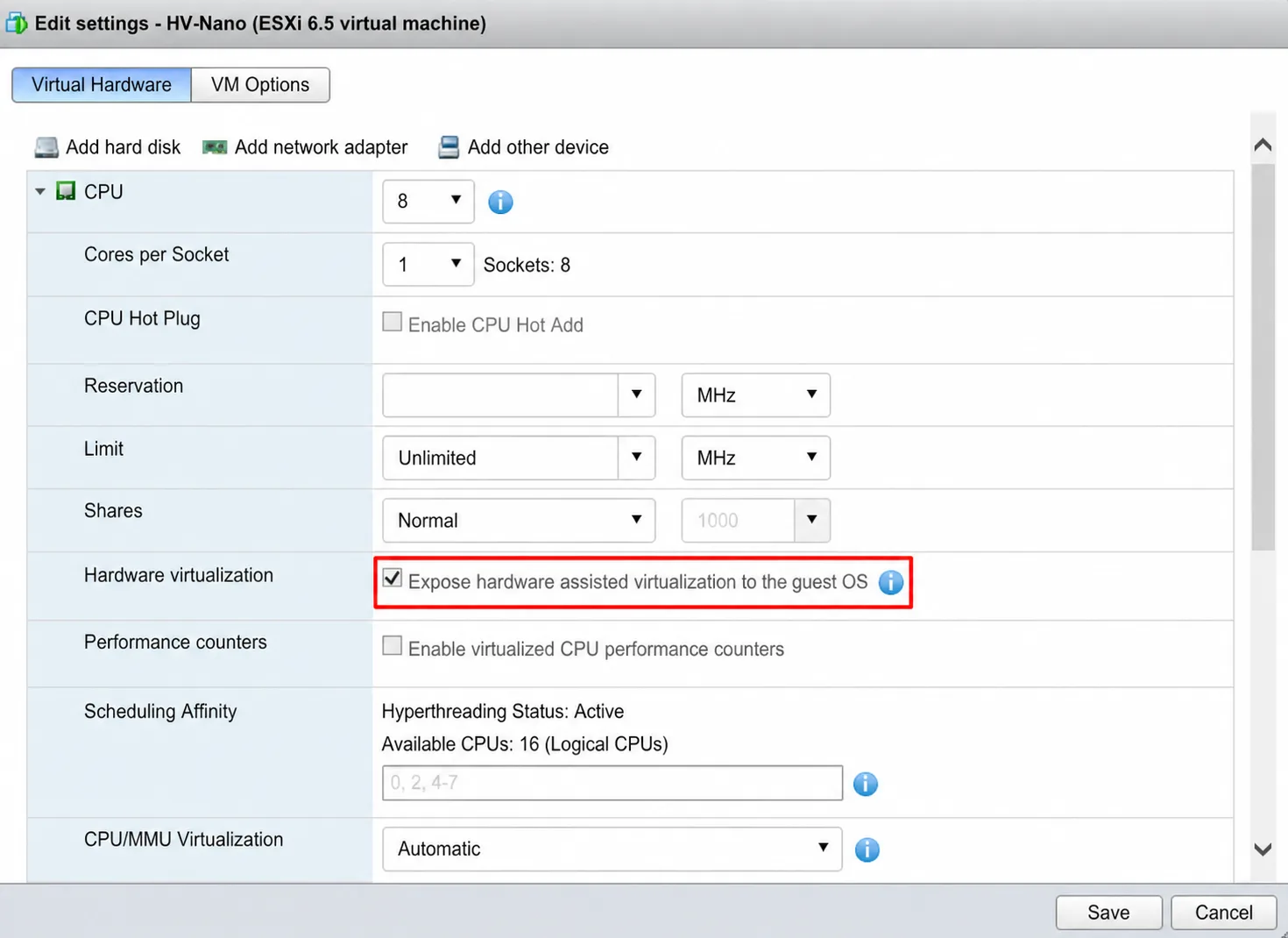
| Resource | Recommendation |
|---|---|
| CPU | According to project sizing, including Nested Virtualization overhead |
| RAM | Based on the number of VMs running inside PVM |
| Storage | VMDK disk with sufficient capacity, preferably on an SSD-backed Datastore |
In this scenario, dedicated hardware RAID or SAN storage is not required. Storage is managed by VMware Datastores.
Network Design
For the best performance, it is recommended to configure the Plaivid virtual machine with two separate network adapters.
| Network Adapter | Usage | Port Group |
|---|---|---|
| vNIC 1 | PVM management | Management Network |
| vNIC 2 | Virtual machine traffic | VM Network |
Benefits of Network Separation
Using two independent network adapters provides the following benefits:
- Prevents VM traffic from affecting the management network.
- Improves security by separating the management network from the user network.
- Simplifies troubleshooting.
- Preserves access to the management console even when the VM network is saturated.
If multiple physical uplinks or vSwitches are available, assign each Port Group to a separate uplink whenever possible to achieve both logical and physical network isolation.
Port Group Configuration
The following security settings must be set to Accept on the Port Group used for virtual machine traffic.
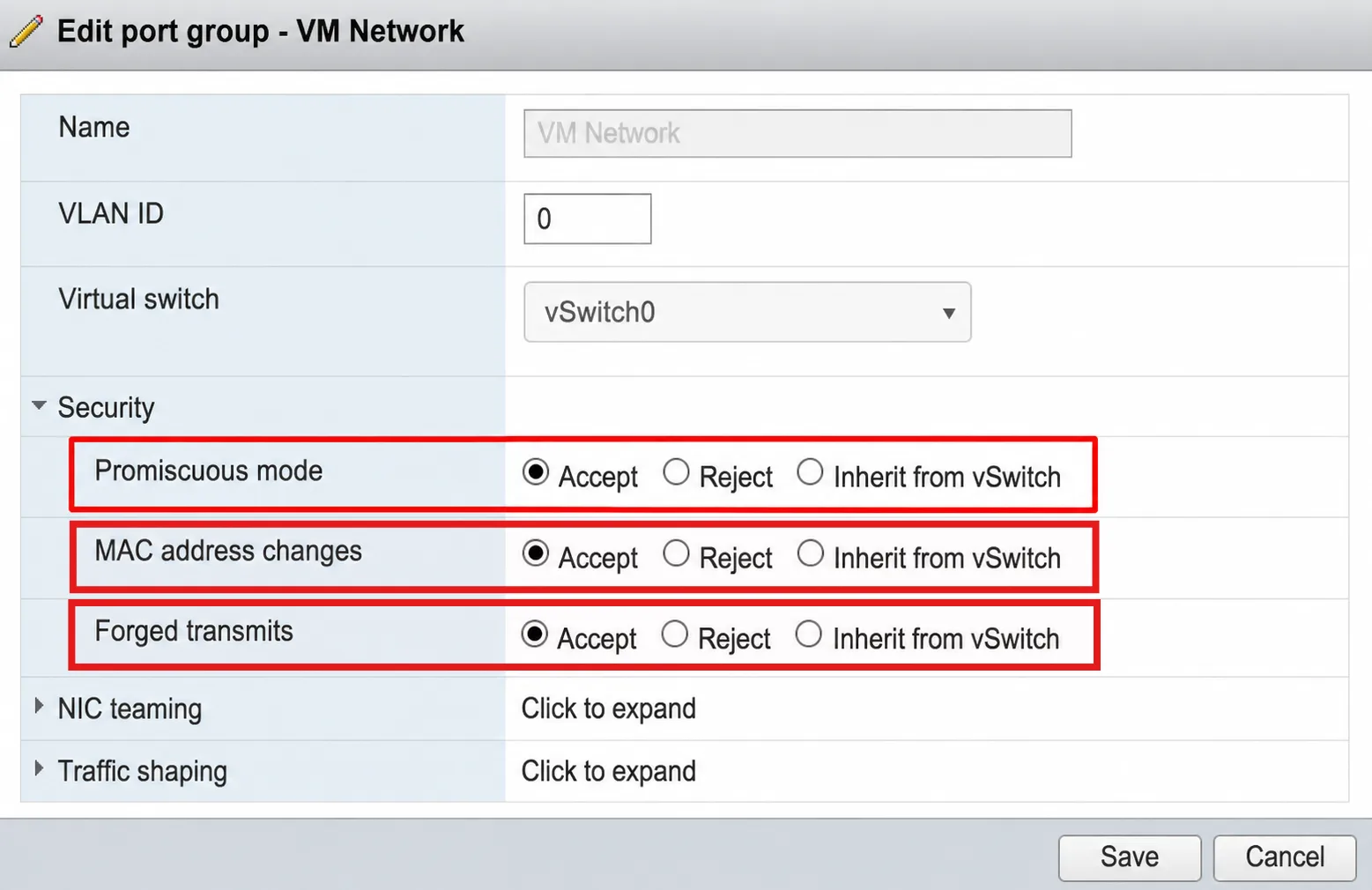
| Setting | Value |
|---|---|
| Promiscuous Mode | ✅ Accept |
| MAC Address Changes | ✅ Accept |
| Forged Transmits | ✅ Accept |
For the management network Port Group, these settings can remain at their default value (Reject).
Required Network Information
Prepare the following network information before starting the deployment.
| Network | Required Information |
|---|---|
| Management | IP Address, Prefix, Gateway |
| VM Network | Access VLAN or Trunk VLAN, depending on the network design |
-
If Promiscuous Mode, MAC Address Changes, or Forged Transmits are not configured as Accept, virtual machines created in Plaivid will not have network connectivity.
-
If Expose hardware-assisted virtualization to the guest OS is not enabled, Plaivid will not be able to run virtual machines.