Plaivid Platform Network Architecture
Physical Layout of Network Ports
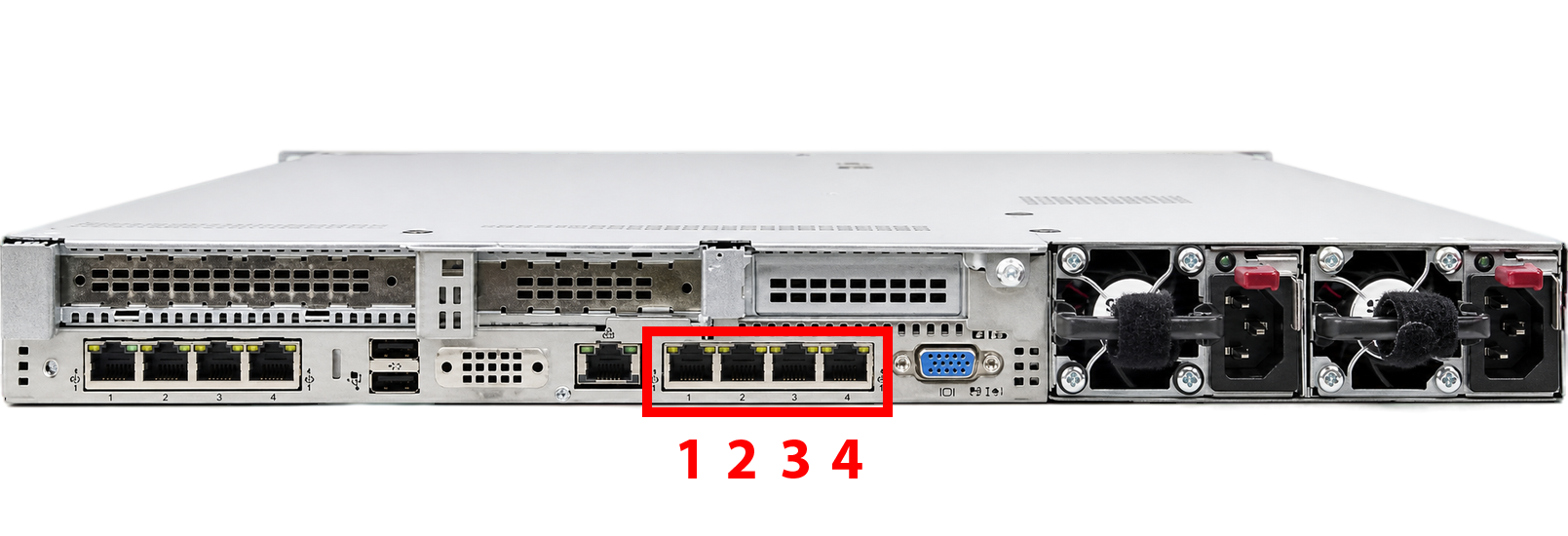
Plaivid requires at least four physical network ports (NICs) on the server, utilized as follows:
| Port | Description | Label |
|---|---|---|
| Port 1 | Management Network (Management) | MGMT |
| Port 2 | Pass-through for Virtual Machine Traffic (VM Traffic) | VM |
| Port 3 | Backup Server / Replicate / VM Traffic / LACP with Port 2 | FLEX-1 |
| Port 4 | Backup Server / Replicate / VM Traffic / LACP with Port 2 | FLEX-2 |
Ports 3 and 4 can each be configured independently in one of the following four modes:
- Backup Server – Dedicated connection to the backup server
- Replicate – Replication traffic between nodes
- VM Traffic – Pass-through for virtual machine traffic (similar to Port 2)
- LACP with Port 2 – Link Aggregation (802.3ad) with Port 2 to increase bandwidth and provide Redundancy for VM traffic
This physical separation guarantees the isolation of management traffic from virtual machine traffic and other services, allowing for independent security policies.
Management Network Architecture
The diagram below illustrates the connection between the server, management switch, and admin system.
Port 1 – Management Network (MGMT)
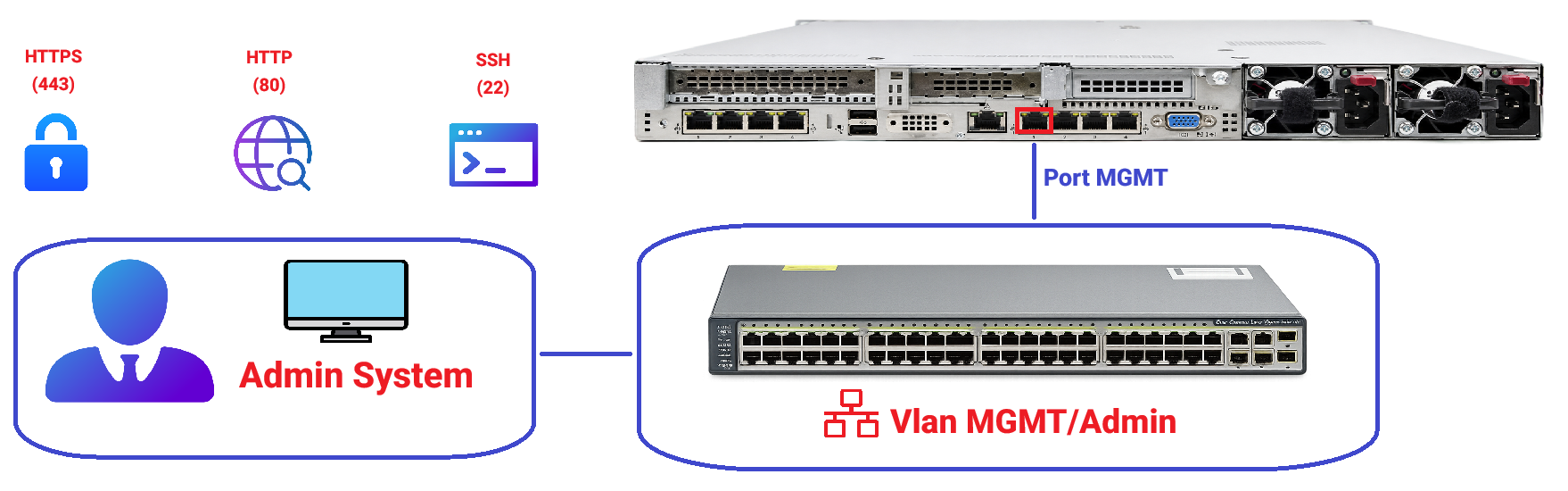
This port must be configured in Access mode; using Trunk mode is strictly prohibited. Connecting this port to a switch in Trunk mode can cause disruptions in network performance and communication issues.
- Usage: Administrative access for admins to Plaivid and its infrastructure.
- Connection: Connected to the datacenter's management VLAN/Segment or corporate network.
- Required Protocols and Ports from Admin side to this port:
TCP 443– Access to Plaivid web management panel (HTTPS)TCP 80– If needed, HTTP (Redirect to HTTPS or emergency access)TCP 22– SSH access to OS/management nodes (if required)
Security Recommendation:
- On firewall, ACL, or Security Group, restrict access to this port only to networks and IPs of admins (NOC/DevOps/Support).
- Public Internet access to this port is forbidden by default unless via VPN, Jump Host, or Bastion.
Port 2 – VM Traffic Network (VM)
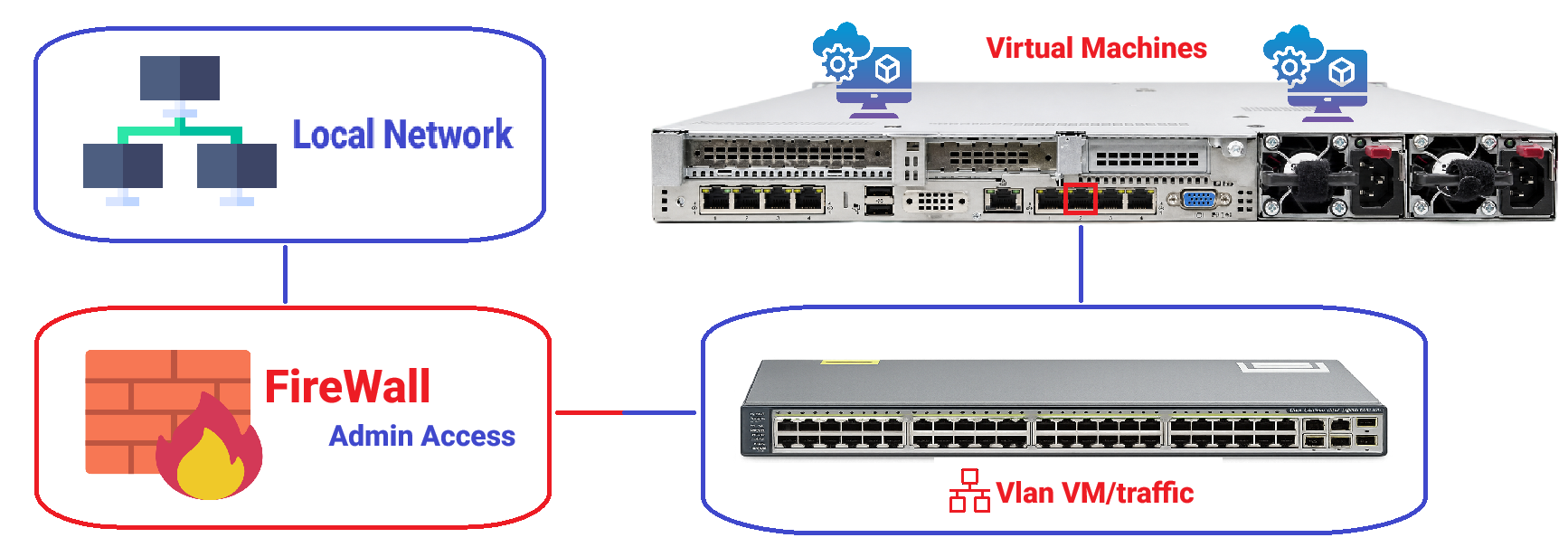
This port can be configured in either Access or Trunk mode. If Trunk is required for any reason, the relevant VLAN Tag must be defined in the Plaivid Virtual Switch settings so that VLAN traffic passes tagged through this port. Otherwise, VLAN traffic will not be processed correctly.
-
Usage: Pass-through for network traffic of virtual machines (VMs) hosted on Plaivid.
-
Connection: Connected to the specific VLAN/Segment for virtual machines in the corporate network.
-
Key Feature:
- Virtual NICs of VMs connect to the Virtual Switch linked to this physical port.
- The Plaivid server itself does NOT pass management traffic through this port.
- VMs receive IPs through this port (via Corporate DHCP or Static) and connect to the internal network and/or Internet.
- This structure enables complete isolation of VM traffic from the server's management traffic.
-
Ports and Protocols:
- DHCP (UDP 67/68) for assigning IPs to VMs (if using Corporate DHCP)
- Outbound/Inbound traffic required by VMs (HTTP/HTTPS and other ports based on organizational policy)
Port 3 & Port 4 – Flexible Ports (FLEX-1 / FLEX-2)
Ports 3 and 4 have high flexibility, and each can be independently configured in one of the four scenarios below:
Connection to Backup Server
-
Usage: Dedicated connection to a backup server for transferring Backup and Restore data.
-
Connection: Connected to a dedicated Backup network/segment or directly to the Backup server.
-
Benefits:
- Complete separation of Backup traffic from operational and management traffic.
- No impact of Backup/Restore processes on VM network performance or management network.
- Ability to run Backups during non-working hours without worrying about bandwidth occupation.
-
Common Protocols and Ports:
- Depending on the Backup software used (e.g., NFS, iSCSI, SSH/SCP, or proprietary protocol).
- It is recommended that the firewall or ACL only allow traffic between the Plaivid server and Backup server.
This port should be configured in Access mode, unless the Backup server is on a separate VLAN, in which case Trunk with a specific VLAN Tag is required.
Inter-node Replication Traffic
-
Usage: Sending and receiving Replication data between Plaivid nodes in Cluster or High Availability (HA) scenarios.
-
Connection: Connected to a dedicated Replication network/segment between server nodes.
-
Benefits:
- Dedicated bandwidth allocation for Replication, preventing interference with VM or management traffic.
- Reduced Latency for Replication operations.
- Increased stability and speed of data synchronization between nodes.
-
Protocols:
- Depends on the type of Replication (Storage Replication, VM Live Migration, ...)
- Usually heavy and continuous traffic; high bandwidth is recommended.
For Replication, using 10GbE links or higher between nodes is recommended. Also, this network must not traverse the public Internet or insecure networks.
Virtual Machine Traffic Pass-through
It is recommended that this port be configured in Access mode. If there is a need to use Trunk for any reason, the relevant VLAN Tag must be defined in the Plaivid Virtual Switch settings so that VLAN traffic passes tagged through this port.
Usage: Adding an additional network path for virtual machine traffic (similar to Port 2). Connection: Connected to the same VM VLAN/Segment or a different VLAN depending on the corporate network design. Benefits:
- Possibility of assigning different VMs' traffic to different physical ports.
- Distribution of VM traffic load across multiple physical ports.
- Possibility of separating traffic for different groups of VMs (e.g., Production and Development).
Key Feature:
- Virtual NICs of VMs connect to the Virtual Switch linked to this port.
- VMs receive IPs through this port and connect to the network.
Link Aggregation with Port 2 (LACP 802.3ad)
-
Usage: Creating an aggregated link (Bond) between Port 2 and this port to increase bandwidth and provide Fault Tolerance (Redundancy) for VM traffic.
-
Connection: Both ports (2 and this port) connect to a switch configured for LACP (802.3ad).
-
Benefits:
- Doubling effective bandwidth for VM traffic.
- Failover Tolerance: If one link fails, traffic automatically switches to the other link.
- Increased service availability for virtual machines.
-
Prerequisites:
- The connected switch must support LACP (IEEE 802.3ad).
- LACP configuration must be performed on both the switch and Plaivid.
- Both ports must connect to one switch (or vPC/MLAG redundant switches).
In LACP mode, both member ports of the Bond must have identical configuration (speed, Duplex, VLAN). Configuration mismatches can cause Bond instability and loss of connectivity.
Common Combinations for Ports 3 and 4:
| Scenario | Port 3 | Port 4 | Use Case |
|---|---|---|---|
| HA + Backup | Replicate | Backup Server | Two-node cluster with dedicated Backup |
| Max VM Bandwidth | LACP with Port 2 | LACP with Port 2 | Triple aggregation for heavy VM traffic |
| Multiple VM Networks | VM Traffic | VM Traffic | Separation of VM traffic across different VLANs |
| Backup + Extra VM | VM Traffic | Backup Server | Extra VM network + Independent Backup |
| LACP + Backup | LACP with Port 2 | Backup Server | High VM Bandwidth + Dedicated Backup |
| Replicate + Extra VM | Replicate | VM Traffic | Inter-node Replication + Separate VM network |
Decision-making varies based on policies and organizational needs.
Logical Network Segmentation
For each physical port, a logical network (VLAN/Segment) is defined:
| Logical Network | Physical Port | Description |
|---|---|---|
| MGMT-NET | Port 1 | Management Network |
| VM-NET | Port 2 | Virtual Machine Traffic Network |
| FLEX-1-NET | Port 3 | Backup / Replicate / VM Traffic / LACP |
| FLEX-2-NET | Port 4 | Backup / Replicate / VM Traffic / LACP |
Management Network (MGMT-NET)
-
Purpose: Access for system management teams, support, and monitoring to Plaivid.
-
Traffic Includes:
- HTTPS/HTTP for the management panel.
- SSH for OS access and emergency management.
- Internal management communications between nodes (in case of Cluster/HA).
-
Recommended Security Policy:
- Access only from specified IPs/Mgmt VLANs.
- Full logging for successful and failed access attempts.
- Preferably behind VPN or Jump Host if possible.
Virtual Machine Traffic Network (VM-NET)
-
Purpose: Pass-through of network traffic for virtual machines hosted on Plaivid.
-
Traffic Includes:
- All Inbound/Outbound traffic of virtual machines.
- DHCP for assigning IPs to VMs (if using Corporate DHCP).
- VM traffic accessing the internal corporate network and/or Internet.
-
Key Architectural Point:
- The Plaivid server does not directly pass management traffic through this port.
- This port acts as a bridge for virtual machines.
- Routing to the Internet or internal corporate network is established based on this Segment.
-
Benefit:
- Complete Isolation of VM Traffic from Management Traffic:
- The control server (Plaivid) is not exposed to VM traffic.
- Applying Policies on VM traffic is done independently of the server.
- Complete Isolation of VM Traffic from Management Traffic:
-
Recommended Security Policy:
- Any administrative access (SSH, Admin Panel) from this network should be blocked.
- If external publishing is required, protect with WAF / Reverse Proxy / Load Balancer.
Flexible Networks (FLEX-1-NET / FLEX-2-NET)
- Purpose: Flexibility in assigning roles based on organizational needs.
- Uses (Based on Selected Scenario):
- Backup Server: Dedicated network for connecting to the backup server.
- Replicate: Dedicated inter-node Replication network.
- VM Traffic: Additional network for passing VM traffic.
- LACP with Port 2: Link aggregation with Port 2 (no independent logical network – Bond member).
Firewall and Communication Port Requirements
Management Network (Port 1 / MGMT-NET)
From Admin Network to this port:
-
Allow:
TCP 443– Plaivid Web Management PanelTCP 80– HTTP (If required)TCP 22– SSH (If required and preferably restricted to specific IPs)
-
Deny:
- Any other traffic from non-management networks.
- Access from Public Internet unless via VPN/Jumphost.
VM Traffic Network (Port 2 / VM-NET)
Virtual Machine Traffic from/to this port:
-
Allow:
- DHCP (UDP 67/68) for assigning IPs to VMs.
- Required outbound traffic for VMs (HTTP/HTTPS and other ports based on organizational policy).
- Return traffic related to VM Sessions.
-
Deny/Control:
- Direct access to Plaivid management IPs (MGMT-NET) except in specific scenarios with defined policy.
TCP 22and other management ports.- If necessary, limit protocols, destinations, and bandwidth based on security and usage policies.
Flexible Ports (Port 3 & Port 4)
Firewall requirements depend on the selected scenario:
Backup Server Scenario:
- Allow:
- Backup protocols in use (NFS, iSCSI, SSH/SCP, or proprietary protocol).
- Only traffic between Plaivid server and Backup server.
- Deny:
- Any other traffic.
Replicate Scenario:
- Allow:
- Inter-node Replication protocols.
- Only traffic between Plaivid nodes.
- Deny:
- Any traffic outside of cluster nodes.
VM Traffic Scenario:
- Similar rules as Port 2 / VM-NET.
LACP Scenario:
- No independent rules – Member of Bond with Port 2, so VM-NET rules apply.
IP Addressing and DHCP Settings
Management Network (MGMT-NET)
- Static IP for Plaivid:
- Example:
10.10.1.10/24
- Example:
- Gateway and DNS according to corporate network design.
- DHCP for this segment is usually disabled or restricted to management equipment only.
VM Traffic Network (VM-NET)
- On this segment, DHCP is activated by the organization, and the IP address pool is designed based on the number of virtual machines.
- Virtual NICs of VMs connect to this segment and receive IP addresses from this DHCP.
- Routes for the Internet and internal corporate network are implemented within this segment.
- Possibility of using Static IPs for VMs also exists.
In this architecture, the Plaivid server can:
- Have no IP on VM-NET at all OR
- Have a limited IP for specific needs (no direct Public Internet access).
Flexible Ports (FLEX-1 / FLEX-2)
Backup Server:
- Static IP in dedicated Backup Subnet.
- Example:
10.30.1.10/24
Replicate:
- Static IP in dedicated Replication Subnet.
- Example:
10.40.1.10/24 - Recommendation: Use a separate subnet with High MTU (Jumbo Frames 9000).
VM Traffic:
- Similar to VM-NET or different VLAN depending on design.
- DHCP or Static according to organizational policy.
LACP:
- No independent IP – Addressing is via Bond Interface (shared with Port 2).
Security and Network Isolation
Access Layer Isolation
- Admin Access → Only via Port 1 (MGMT-NET)
- VM Traffic → Via Port 2 (VM-NET) and optionally Port 3/4
- Backup Traffic → Via Port 3 or 4 (if Backup scenario selected)
- Replication Traffic → Via Port 3 or 4 (if Replicate scenario selected)
This model implements the classic Attack Surface Reduction and allows defining completely different Rules for each type of traffic.
Separation of Management and Operational Traffic
- The Plaivid server (Control Plane) is managed via the management port (Port 1).
- Virtual machine traffic is completely isolated from management traffic.
- If the organization wishes to filter, limit, or monitor VM traffic, all control is applied on VM-NET without affecting the server's management network.
Replication and Backup Security
- Replication traffic must be encrypted or travel over an isolated network (inaccessible from outside).
- The Backup server should be placed in a separate segment with limited access.
- Logging and monitoring of Backup/Replication traffic is recommended.
Summary
-
Port 1 (MGMT): For Management – Open ports:
443, 80, 22(Only for admins – Management network) -
Port 2 (VM): For Virtual Machine Traffic pass-through – DHCP Active, Plaivid server does not necessarily have management traffic on this port, Virtual Machines connect to the network via this Segment.
-
Port 3 (FLEX-1): Configurable as: Backup Server / Replicate / VM Traffic / LACP with Port 2
-
Port 4 (FLEX-2): Configurable as: Backup Server / Replicate / VM Traffic / LACP with Port 2
This architecture provides complete isolation of management traffic from virtual machine traffic, offers high flexibility in configuring additional ports, and is standard and scalable from a security and operational perspective.