Inad Platform Network Architecture
Physical Layout of Network Ports
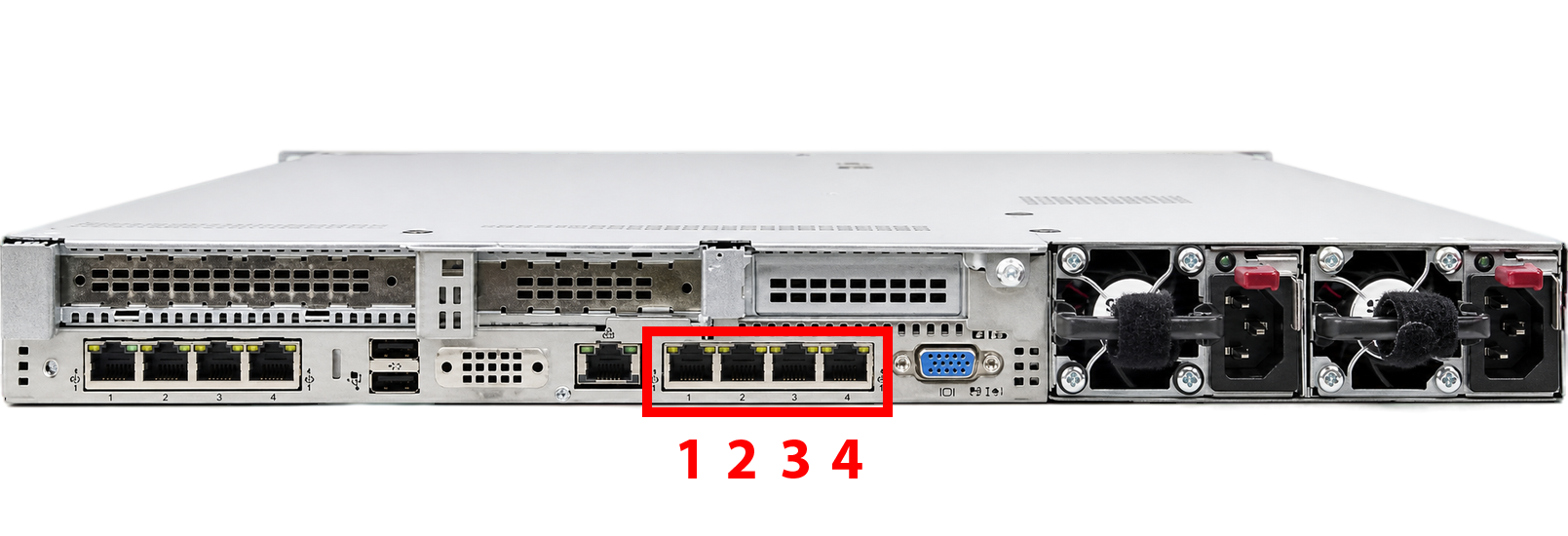
Inad uses at least four physical network ports (NICs) on the server as follows:
| Port | Description | Label |
|---|---|---|
| Port 1 | Management Network | MGMT |
| Port 2 | User Web Access | WEB |
| Port 3 | Internet/Uplink for VDI and Containers | INET |
| Port 4 | LACP / Backup / Auxiliary | AUX |
This physical separation guarantees the isolation of management traffic, user traffic, and VDI/Container internet traffic, facilitating the enforcement of independent security policies.
Management Network Architecture
The following diagram shows the connection between the server, the management switch, and the admin system.
Port 1 – Management Network (MGMT)
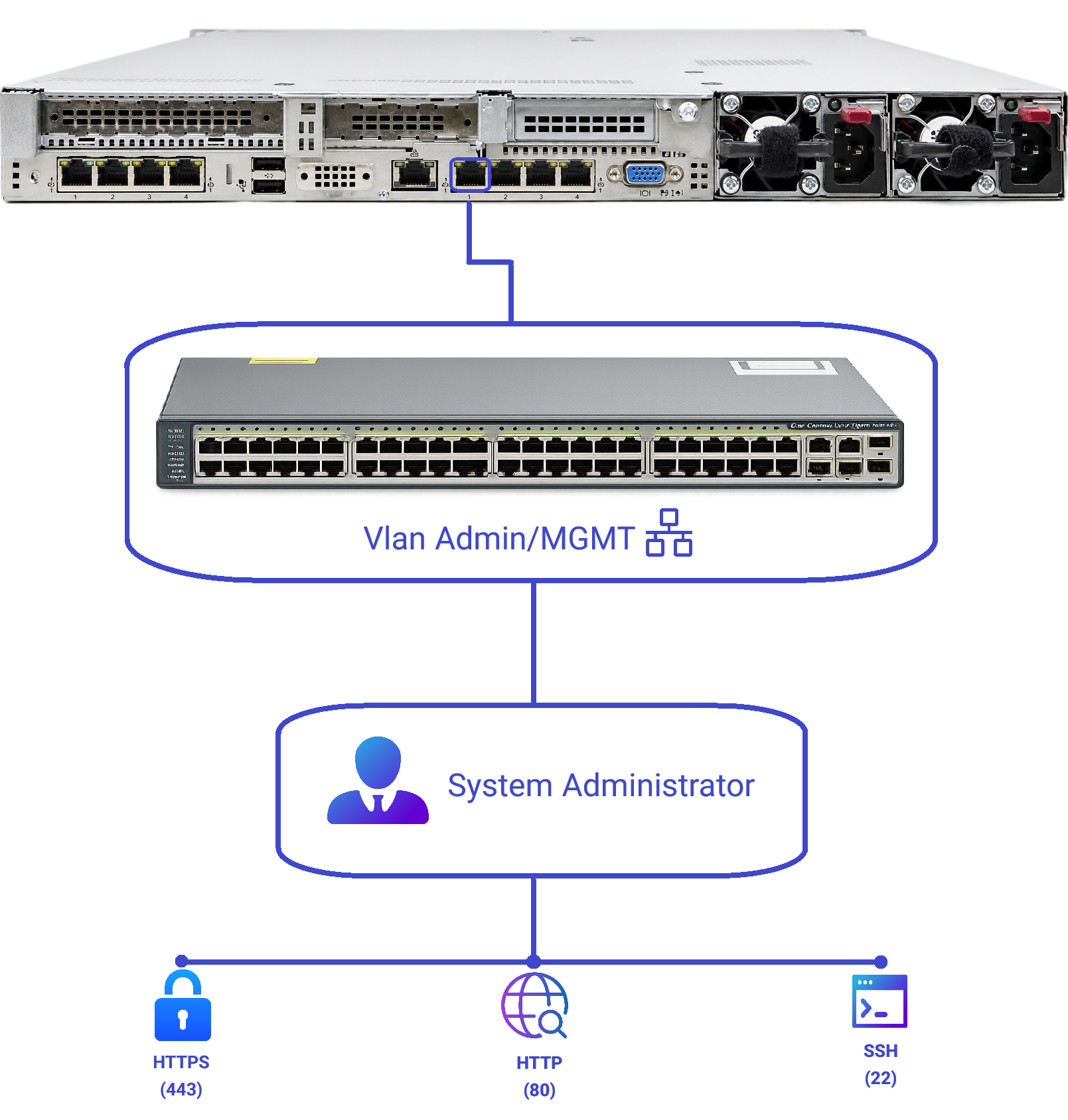
This port must be configured in Access mode. Using Trunk mode is strictly prohibited. Connecting this port to a switch in Trunk mode can cause network malfunctions and communication issues.
- Usage:
Management access for admins to Inad and its infrastructure. - Connection:
Connected to the Datacenter's management VLAN/Segment or corporate network. - Required Protocols and Ports from Admin side to this port:
TCP 443– Access to Inad's administrative web panel (HTTPS)TCP 80– HTTP if needed (Redirect to HTTPS or emergency access)TCP 22– SSH access to the OS/management nodes (if required)
Security Recommendation:
- On the firewall, ACL, or Security Group, restrict access to this port only to admin networks and IPs (NOC/DevOps/Support).
- Public internet access to this port is prohibited by default unless via VPN, Jump Host, or Bastion.
Port 2 – User Web Access (WEB)
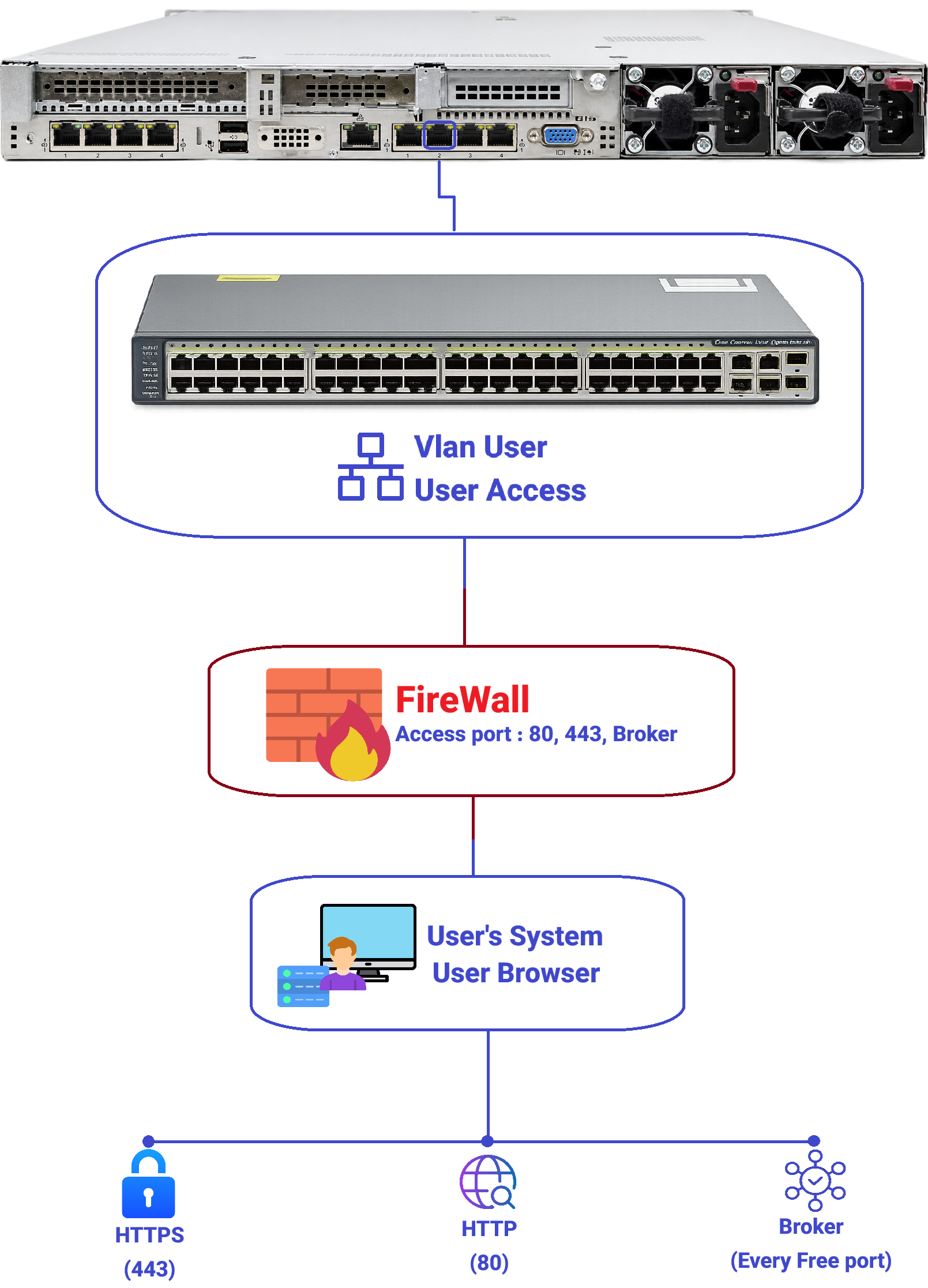
It is recommended to configure this port in Access mode. If there is a compelling reason to use Trunk, the relevant VLAN Tag must be defined in the Payvind Virtual Switch settings so that VLAN traffic passes through this port as Tagged. Otherwise, VLAN traffic will not be processed correctly.
- Usage:
End-user access to Inad's web services (User Portal, Applications, and VDI Broker if needed). - Connection:
Connected to the internal corporate User VLAN/Segment or DMZ for internal/external access. - Required Ports from Users to this port:
TCP 443– Main web services (HTTPS)TCP 80– For Redirect to HTTPS or limited HTTP usage- VDI Broker Port (Configurable) – For communication between VDI clients and Inad Broker
- This port is configurable in Inad settings and must be opened on the firewall according to the set value.
Note:
- All these ports are configurable within Inad's configuration.
- After any port change, firewall/Load Balancer rules must be updated accordingly.
Port 3 – Internet / Uplink Network (INET)
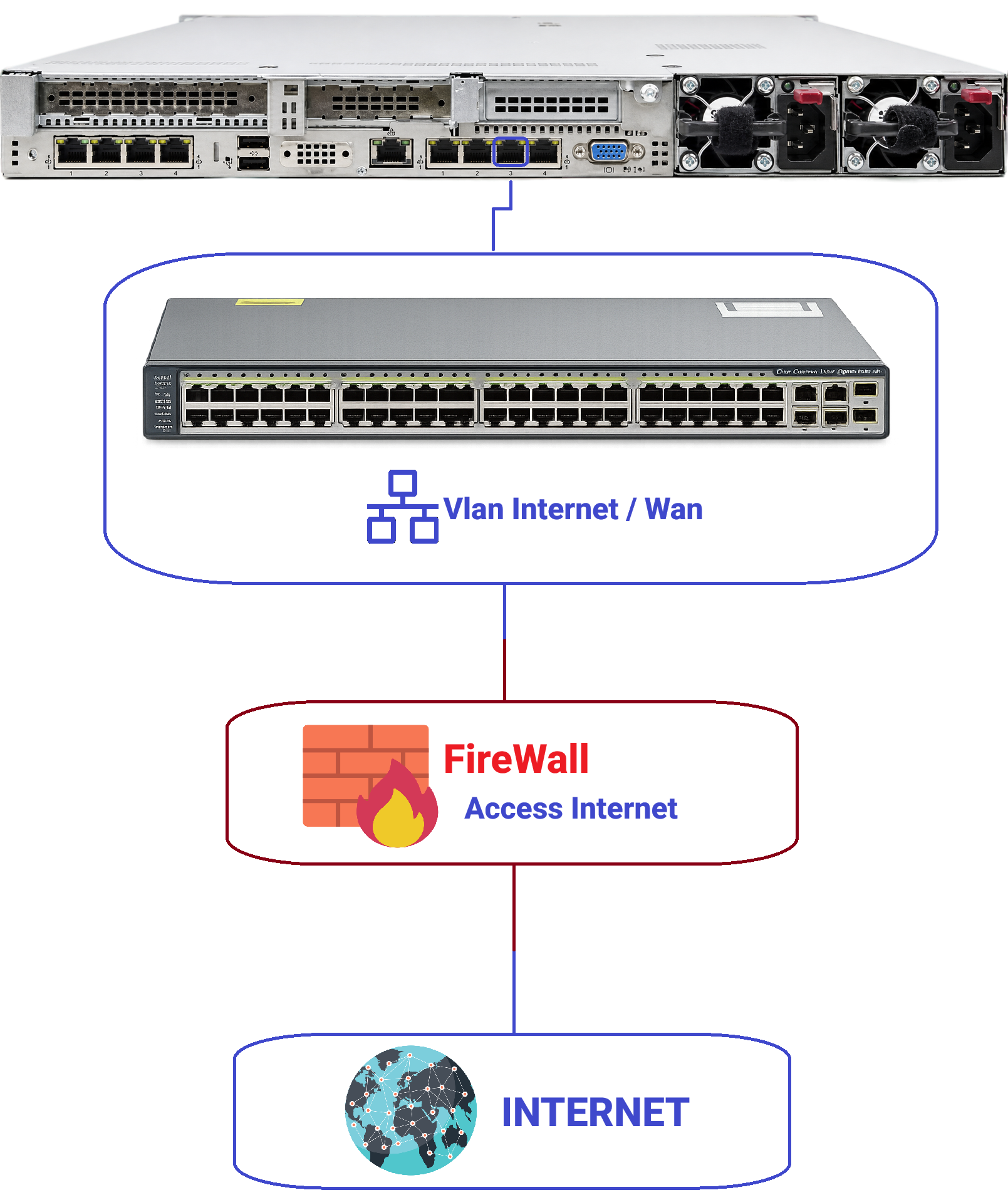
It is recommended to configure this port in Access mode. If there is a compelling reason to use Trunk, the relevant VLAN Tag must be defined in the Payvind Virtual Switch settings so that VLAN traffic passes through this port as Tagged. Otherwise, VLAN traffic will not be processed correctly.
- Usage:
Providing network access for VDI and Containers to the internet and internal corporate network (Upstream). - Connection:
Connected to a network where the corporate DHCP is active and an IP address pool is allocated for VDI/Container. - Key Feature:
- The Inad server itself does not have direct internet via this port.
- Only VDIs and Containers receive an IP through this port and connect to the internet and internal corporate network.
- This structure allows for complete internet separation between the server and user machines.
Port 4 – LACP / Backup / Auxiliary (AUX)
- Possible Usages:
- Participating in a Link Aggregation (LACP 802.3ad) with another port (e.g., aggregation with Port 2 or Port 3 for bandwidth increase and Redundancy).
- Used as a dedicated Backup port to connect to the Backup Server for backup and restore operations.
- Use for specific organizational needs (such as Backup network, Monitoring, or Replication).
Suggested Scenarios:
-
LACP Scenario:
Port 2 + Port 4 in an LACP Bond for the WEB network to increase bandwidth and fault tolerance.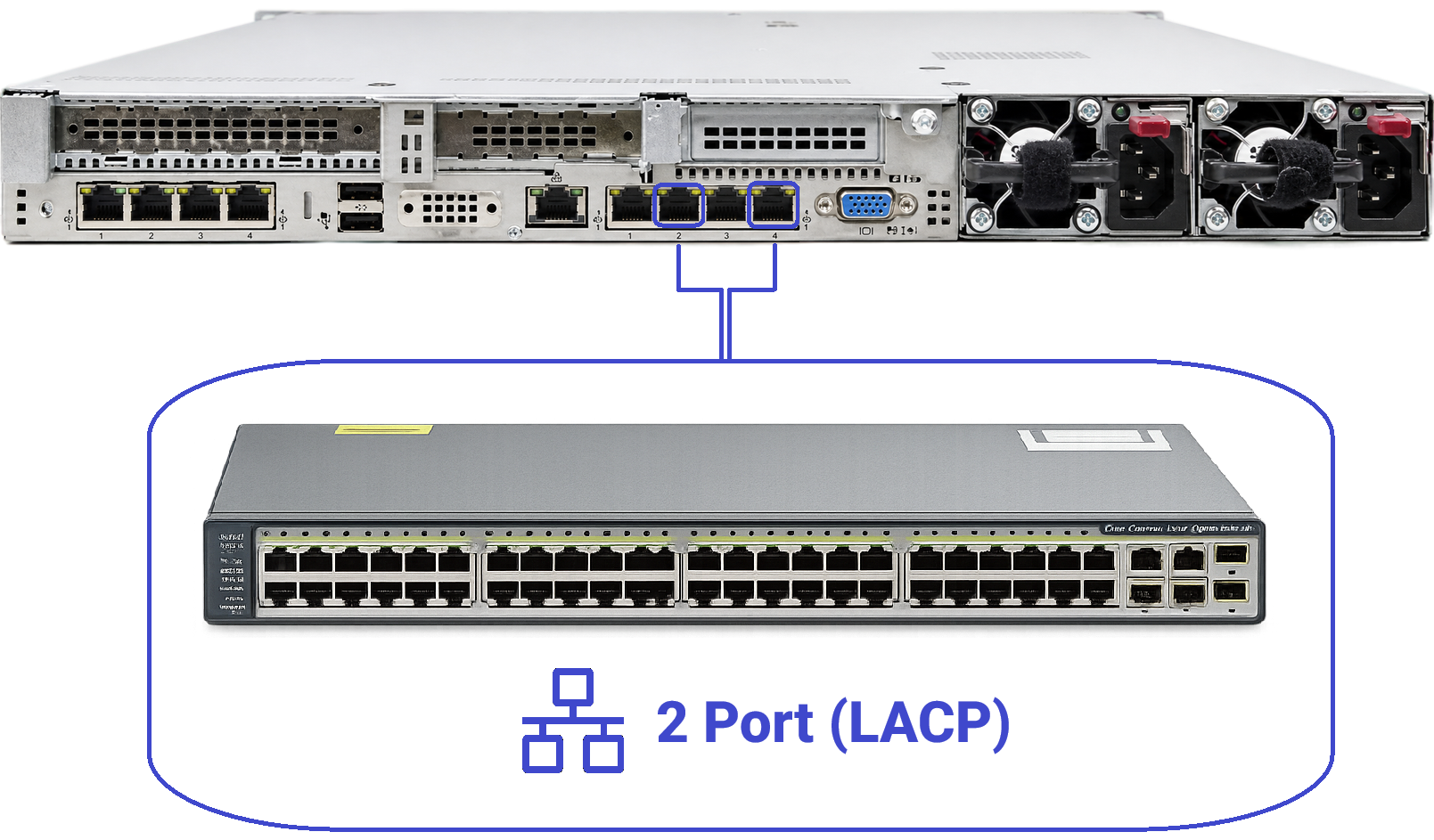
-
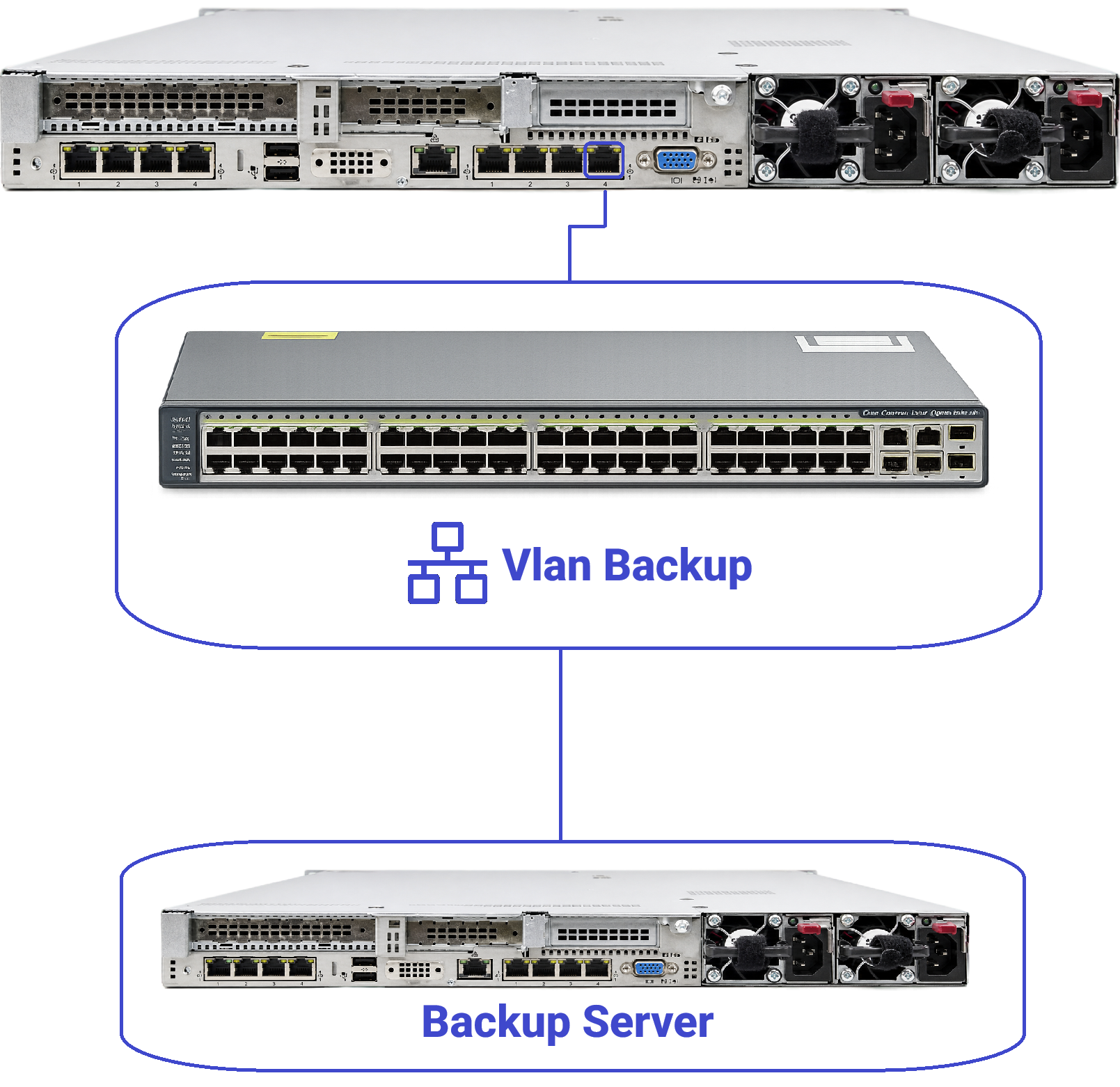
Backup Scenario:
Port 4 is connected to the Backup Server to perform data backup and restore operations through this dedicated link.
Decision-making varies based on organizational policies.
Logical Network Segmentation
For each physical port, a logical network (VLAN/Segment) is defined:
| Logical Network | Physical Port | Description |
|---|---|---|
| MGMT-NET | Port 1 | Management Network |
| WEB-NET | Port 2 | Web Network |
| INET-NET | Port 3 | Internet Network |
| AUX-NET | Port 4 | LACP, Backup, or others based on design |
Management Network (MGMT-NET)
-
Goal:
Access for System Management, Support, and Monitoring teams to Inad. -
Traffic Includes:
- HTTPS/HTTP for the management panel.
- SSH for OS access and emergency management.
- Internal management communications between nodes (in case of Cluster/HA).
-
Proposed Security Policy:
- Access only from specified IPs/Management VLANs.
- Complete logging for successful and failed access attempts.
- Preferably behind VPN or Jump Host whenever possible.
User Access Network (WEB-NET)
-
Goal:
Serving web requests from corporate users or external users. -
Traffic Includes:
- HTTPS/HTTP for portals, web applications.
- VDI Broker Port for establishing VDI sessions if used.
-
Proposed Security Policy:
- Only Web and VDI Broker ports should be open.
- Any management access (SSH, Admin Panel) from this network should be blocked or restricted to a specific Reverse Proxy/Backend role.
- If published externally, protect with WAF / Reverse Proxy / Load Balancer.
Internet / Uplink Network (INET-NET)
-
Goal:
Creating a network path for:- Acquiring IPs by VDI and Containers from the corporate DHCP.
- Accessing the internet and internal corporate network for VDI and Containers.
-
Key Architectural Note:
- The Inad server does not directly use this port for the internet.
- This port acts as a communication bridge for user machines:
- Virtual network cards of VDIs and Containers connect to this Segment.
- DHCP is active on this Segment.
- VDI/Container receives an IP from this DHCP.
- Routes to the internet or internal corporate network are established based on this Segment.
-
Benefit:
- Complete Internet Isolation:
- Control server (Inad) is not exposed to the internet.
- Only Endpoints (VDIs/Containers) have internet access.
- Policy/Censorship of content is applied only to the User Segment, not the server.
- Complete Internet Isolation:
Auxiliary / Link Aggregation (LACP) Network (AUX-NET)
- Goal:
Increasing stability, bandwidth, or separating specific services. - Applications:
- Participation in Bond/LACP to increase fault tolerance and throughput.
- Backup/Monitoring/Replication network if needed.
Firewall Requirements and Communication Ports
Management Network (Port 1 / MGMT-NET)
From the Admin network towards this port:
-
Allow:
TCP 443– Inad management web panelTCP 80– HTTP (if required)TCP 22– SSH (if required and preferably restricted to specific IPs)
-
Deny:
- Any other traffic from non-management networks
- Access from public internet except via VPN/Jumphost
User Access Network (Port 2 / WEB-NET)
From Users towards this port:
-
Allow:
TCP 443– Web services (End-users)TCP 80– Redirect/HTTPTCP <VDI_BROKER_PORT>– VDI Broker port (Configurable in Inad settings)
-
Deny:
TCP 22and other management ports- Any unnecessary traffic (e.g., Database, Internal SSH, etc.)
Web and Broker ports in Inad are configurable. Upon change, firewall rules must be updated accordingly.
Internet / Uplink Network (Port 3 / INET-NET)
From INET-NET to VDIs and Containers:
-
Allow:
- DHCP (UDP 67/68) for IP assignment
- Required outbound traffic for users (HTTP/HTTPS and other ports based on corporate policy)
- Return traffic related to user sessions
-
Deny/Control:
- Direct access to Inad's management IPs (MGMT-NET) except in special scenarios with specific policy.
- If necessary, limiting protocols, destinations, and bandwidth based on security and usage policies.
IP Addressing and DHCP Settings
Management Network (MGMT-NET)
- Static IP for Inad:
- Example:
10.10.1.10/24
- Example:
- Gateway and DNS according to corporate network design.
- DHCP for this segment is usually disabled or limited to management equipment.
User Access Network (WEB-NET)
- Static IP for Inad on this Segment:
- Example:
10.20.1.10/24
- Example:
- This IP is the primary destination for user web requests (directly or behind NAT/Load Balancer).
- Possibility of using VIP or additional addresses for HA and Load Balancing scenarios.
Uplink Network (INET-NET)
- On this segment, DHCP is activated by the organization, and the IP address pool is designed based on the number of VDI and Container instances.
- Virtual network cards of VDIs and Containers connect to this Segment and receive an IP from this same DHCP.
- Internet routes and internal corporate network are implemented in this Segment.
In this architecture, the Inad Server can:
- Have no IP at all on INET-NET
OR- Have only a limited IP for specific needs (without direct public internet access).
Security and Network Isolation
Access Layer Separation
- Admin Access → Only through Port 1 (MGMT-NET)
- User Access → Only through Port 2 (WEB-NET)
- Internet for Workloads → Only through Port 3 (INET-NET) for VDI/Container
This model implements the classic Attack Surface Reduction and facilitates defining completely different rules for each type of traffic.
Internet Network Isolation
- The Inad server (Control Plane) is effectively placed in a network without direct internet.
- Only VDIs and Containers have internet access, and even then under corporate policy (Proxy, Content Firewall, Security Filters, ...).
- If the organization wishes to filter, limit, or monitor internet for users, all control is performed on INET-NET without touching the control server.
Summary
-
Port 1 (MGMT):
For Management – Open ports:443, 80, 22(Only for Admins – Management Network) -
Port 2 (WEB):
For User Web Access – Open ports:443, 80and VDI Broker Port (Configurable) -
Port 3 (INET):
For Internet and internal corporate network specifically for VDIs and Containers – DHCP active, Inad server necessarily has no direct internet, but user machines get internet from this Segment. -
Port 4 (AUX):
For LACP, Backup, or other specific applications (Based on organizational design).
This architecture provides both separation between Admin and User access levels and keeps internet active only for user machines, making it operationally secure, standard, and scalable.