Access Level Management
In this section, you will learn about managing organization users. Each user has an effective role based on their membership in the organization and its units, which determines their access level.
Click here to view a summary of role permissions in this guide.
Roles and Access Levels
The system has six roles, ordered from highest to lowest access level:
| Priority | Role |
|---|---|
| 1 | Owner |
| 2 | Admin |
| 3 | Unit Manager |
| 4 | Expert |
| 5 | Member |
| 6 | Viewer |
Limitations
- An organization's Owner cannot be changed.
- A unit's Manager cannot be changed.
- Users cannot change their own role.
- Users cannot transfer themselves to another unit.
- Users cannot delete themselves.
- The role and unit of users whose current role is Owner or Unit Manager cannot be changed.
- The role and unit of users whose current role is Admin and who simultaneously manage a unit cannot be changed.
- Users with Owner, Unit Manager, or Admin (if managing a unit) roles cannot be deleted.
Owner Role
The organization Owner is the first user automatically created during registration. This user holds full ownership of the organization.
Viewing Users
- Owners can view the list of all users in their organization.
- Owners can view the details of any user in their organization.
Creating a New User
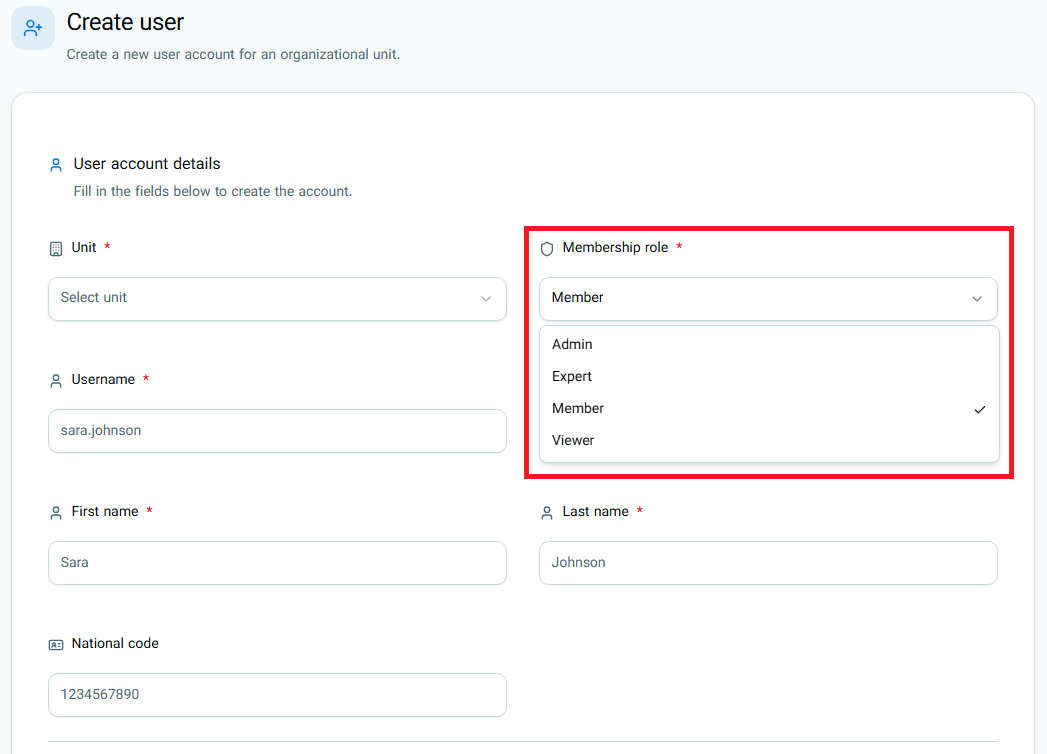
Owners can create new users in their organization. When creating a new user:
- The new user's role can be one of the following:
- Admin
- Expert
- Member
- Viewer
Editing Users
Owners can edit information about users in their organization.
In practice, Owners can only change the role or unit of users whose current role is Admin (provided they are not a Unit Manager), Expert, Member, or Viewer.
Deleting Users
Owners can delete users from their organization. Deleted user data is not erased; instead, the account is deactivated.
In practice, Owners can delete users with the roles Admin (if not a Unit Manager), Expert, Member, and Viewer.
Viewing Units
- Owners can view the list of all units in their organization.
- Owners can view the details of any unit in their organization.
Creating a New Unit
Owners can create new units within their organization.
Editing Units
Owners can edit their organization's units.
In this section, Owners can modify unit information, unit type, parent unit, contact details, and the unit avatar.
Editing Organization
Owners can edit their organization's information.
In this section, Owners can modify main organization details, contact information, and the organization avatar.
Admin Role
Admins hold the second-highest level of access in the organization and have many management capabilities, although their permissions are more limited than those of the Owner.
Viewing Users
- Admins can view the list of all users in their organization.
- Admins can view the details of any user in their organization.
Creating a New User
Admins can create new users in their organization. When creating a new user:
- The new user's role can only be one of the following:
- Admin
- Expert
- Member
- Viewer
Editing Users
Admins can edit information about users in their organization, with the following restrictions:
- They cannot edit an Owner's information.
- They cannot change another Admin's role.
- They cannot move another Admin to a different unit.
Admins can only change the unit and role of users with Expert, Member, or Viewer roles.
Deleting Users
- Admins cannot delete another Admin.
In practice, Admins can delete users with Expert, Member, and Viewer roles.
Viewing Units
- Admins can view the list of all units in their organization.
- Admins can view the details of any unit in their organization.
Creating a New Unit
Admins can create new units in their organization.
Editing Units
Admins can edit their organization's units.
In this section, Admins can modify unit information, unit type, parent unit, contact details, and the unit avatar.
Editing Organization
Admins do not have permission to edit organization information.
Unit Manager Role
Unit Managers only have authority within the unit they manage. Unlike Owners and Admins, this role does not have organization-wide visibility or management access.
Viewing Users
- Unit Managers only see users in their own unit in the user list.
- Unit Managers can view details of users in their unit, except users whose effective role is Admin or higher.
Creating a New User
Unit Managers can create new users.
- The new user's role can only be one of the following:
- Expert
- Member
- Viewer
Editing Users
Unit Managers can only edit users within their own unit under the following restrictions:
- They can only edit users whose role is Expert, Member, or Viewer.
- The new role of users can only be Expert, Member, or Viewer.
- They cannot transfer a user to another unit.
Deleting Users
Unit Managers do not have permission to delete users.
Creating a New Unit
Unit Managers do not have permission to create new units.
Editing Units
Unit Managers can only edit the unit they manage.
In this section, Unit Managers can modify unit information, unit type, parent unit, contact details, and the avatar of that unit.
Editing Organization
Unit Managers do not have permission to edit organization information.
Expert, Member, and Viewer Roles
These three roles do not have administrative privileges in the user management section and cannot:
- View the administrative list of organization users.
- Create new users.
- Create new units.
- Edit unit information.
- Edit organization information.
- Edit other users' information.
- Delete users.
Editing Personal Profile
Any active, authenticated user, regardless of their role, can view and edit their own profile.
Editable Information
- First Name
- Last Name
- Username
- National ID
- Description
- Contact Information
- Profile Picture
Important Notes
Owner Role: The Owner role is assigned automatically only during initial organization registration. After that, it cannot be assigned to another user from the user management section.
Unit Manager Role: The Unit Manager role cannot be selected from the user creation or editing section. Assigning a Unit Manager is done through unit creation/management.
Admin Who Is Also a Unit Manager: Such a user is still considered an Admin in terms of their effective role in the organization. However, because they also manage a unit, the system applies special protection to them. As a result, the Owner or other Admins cannot easily change their role, unit, or status, or delete them.
Role Permissions Overview at a Glance
| Role | Edit Organization | Unit List | Create Unit | Edit Units | User List | Create User | Edit Users | Delete Users | Edit Personal Profile |
|---|---|---|---|---|---|---|---|---|---|
| Owner | Yes | Yes | Yes | Yes | Yes | Yes | Yes | Yes | Yes |
| Admin | No | Yes | Yes | Yes | Yes | Yes | Yes | Yes | Yes |
| Unit Manager | No | No | No | Yes (Own unit only) | Yes (Own unit only) | Yes (Only in own unit) | Yes (Only in own unit) | No | Yes |
| Expert | No | No | No | No | No | No | No | No | Yes |
| Member | No | No | No | No | No | No | No | No | Yes |
| Viewer | No | No | No | No | No | No | No | No | Yes |