Account Login
After completing the registration and organization setup process (or once your account has been created by your organization administrator), you can log in to ArtiNex at any time using your credentials.
Upon logging in, you will be redirected directly to the Dashboard, where you can access features such as tickets and organizational tools.
Login Page
The login process is designed to be quick and straightforward, completed in a single step.
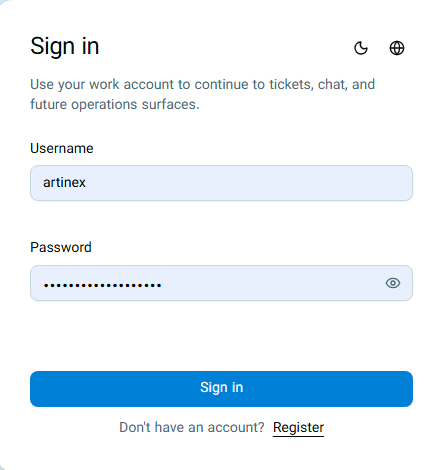
Once your credentials are verified by the system, you will immediately be redirected to the Dashboard.
Login Security and Rate Limiting
To protect your account, ArtiNex monitors failed login attempts:
- If incorrect credentials are entered (up to 5 times), login access will be temporarily blocked.
- This restriction typically lasts around 5 minutes, after which you can try again.
- If too many login requests are sent within a short period, the system may temporarily reject new requests.
If you are unable to log in despite entering the correct credentials, wait a few minutes and try again. If the issue persists, contact support.
Sign Up
If you do not have an account yet or have not created your organization, click the Sign Up option at the bottom of the login form ("Don't have an account? Sign Up") to navigate directly to the registration and organization setup process.
Frequently Asked Questions
What should I do if I forget my password?
If you forget your password, the reset process depends on your role in the organization:
- Organization Users (Admin, Unit Manager, Expert, Member, and Viewer): You can contact your organization's Owner or Admin so they can change your password if deemed appropriate.
- Organization Owner: To maintain account security, please contact System Support directly for the necessary guidance and actions to reset your password.
Can I log in with my email instead of a username?
No. Logging in to the system is only possible using your Username and Password.
Why am I unable to log in despite entering my credentials?
This is typically caused by one of the following reasons:
- An incorrect username or password was entered.
- Login access has been temporarily restricted due to multiple failed attempts (around 10 minutes).
- Too many login requests were sent within a short period.
In this case, wait a few moments and try again. If the problem persists, contact support.